Apple Patches for October 2026
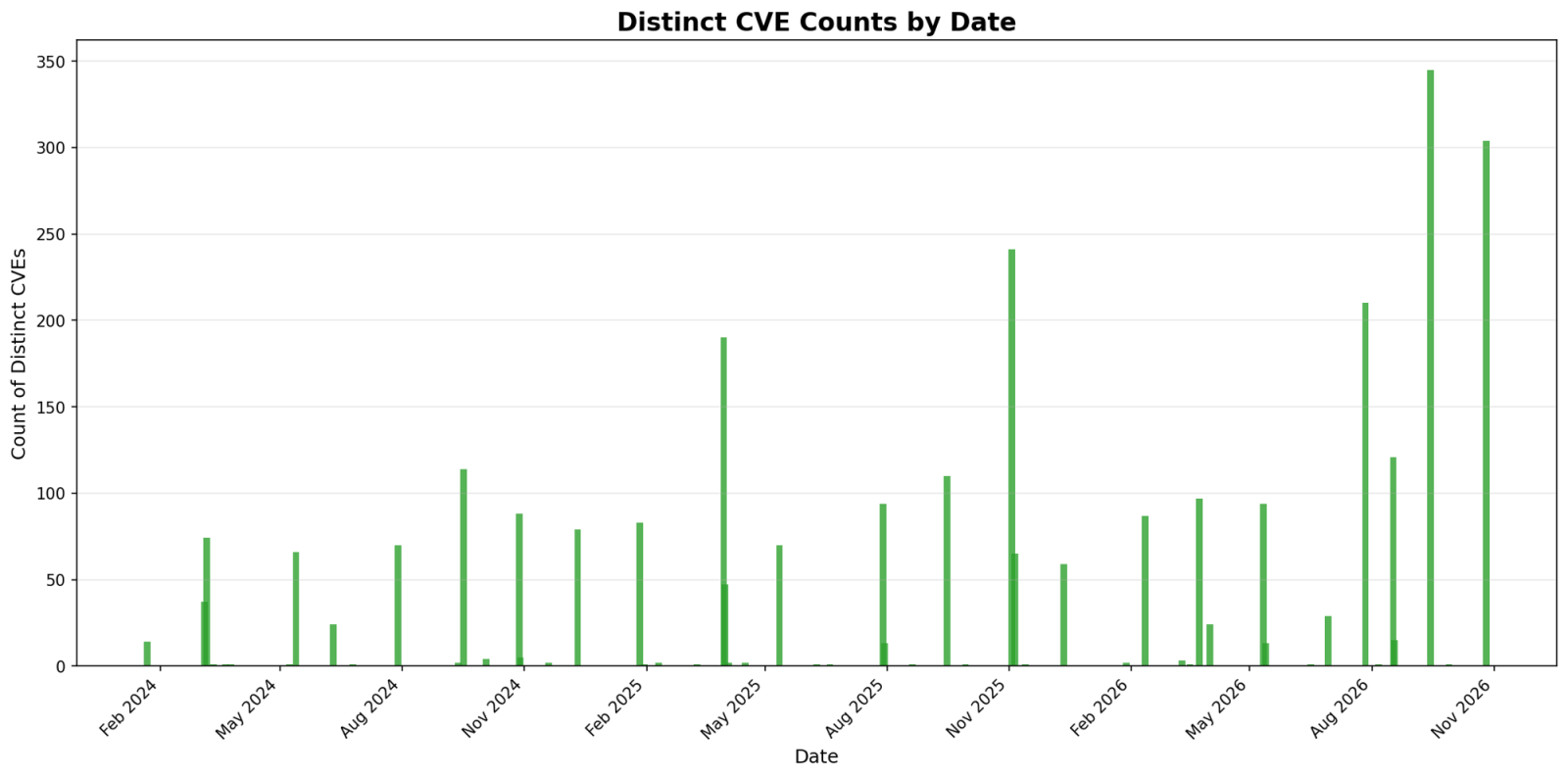
Apple today released patches for 304 vulnerabilties. This number is still in line with prior Apple updates, and comes just about a month after the last apple update.
Noteworthy Issue:
CVE-2026-86950: This is an already exploited vulnerability in CoreGraphics, and was patched originally a month ago. This month's update delivers the corresponding patches for iOS 18.
No new vulnerability is marked as already exploited.
Other Interesting issues:
CVE-2026-86990: A malicious app may access the camera without user permissions.
CVE-2026-28864: A local attacker may gain access to user's Keychain items.
Apple Patch volume (number of CVEs patched) over time:
| iOS 27.2 and iPadOS 27.2 | iOS 26.7.2 and iPadOS 26.7.2 | iOS 18.7.11 and iPadOS 18.7.11 | macOS Golden Gate 27.2 | macOS Tahoe 26.7.2 | macOS Sequoia 15.8.2 | tvOS 27.2 | watchOS 27.2 | visionOS 27.2 | Safari 27.2 |
|---|---|---|---|---|---|---|---|---|---|
| CVE-2022-26704: An app may be able to gain elevated privileges. Affects Spotlight |
|||||||||
| x | x | x | x | ||||||
| CVE-2026-112410: A remote attacker may cause an unexpected process termination. Affects Heimdal |
|||||||||
| x | x | x | |||||||
| CVE-2026-112413: Processing a maliciously crafted file may lead to unexpected app termination. Affects Model I/O |
|||||||||
| x | x | x | x | x | x | ||||
| CVE-2026-112414: Processing a maliciously crafted message may lead to a denial-of-service. Affects Mail |
|||||||||
| x | x | x | x | x | x | ||||
| CVE-2026-112415: An app may be able to cause unexpected system termination or corrupt process memory. Affects AppleAVD |
|||||||||
| x | x | x | x | x | x | ||||
| CVE-2026-112416: Processing a maliciously crafted video file may lead to unexpected app termination. Affects AppleAVD |
|||||||||
| x | x | x | x | x | x | x | |||
| CVE-2026-112417: Processing a maliciously crafted 3D model may lead to memory corruption. Affects RealityKit |
|||||||||
| x | |||||||||
| CVE-2026-112421: An app may be able to modify protected parts of the file system. Affects PackageKit |
|||||||||
| x | x | x | |||||||
| CVE-2026-112423: Processing a maliciously crafted file may lead to a denial-of-service or potentially disclose memory contents. Affects SceneKit |
|||||||||
| x | x | x | x | x | x | ||||
| CVE-2026-112424: An app may be able to cause unexpected system termination or read kernel memory. Affects HFS |
|||||||||
| x | x | x | |||||||
| CVE-2026-112425: Processing a 3D model may result in disclosure of process memory. Affects SceneKit |
|||||||||
| x | x | x | x | x | x | x | |||
| CVE-2026-112427: A remote attacker may be able to cause arbitrary code execution. Affects Remote Management |
|||||||||
| x | |||||||||
| CVE-2026-112428: An app may bypass Gatekeeper checks. Affects DesktopServices |
|||||||||
| x | x | x | |||||||
| CVE-2026-112429: Processing a maliciously crafted file may disclose process memory. Affects ColorSync |
|||||||||
| x | x | x | |||||||
| CVE-2026-112430: An app may be able to gain root privileges. Affects Security |
|||||||||
| x | x | x | |||||||
| CVE-2026-112432: An app may be able to access sensitive user data. Affects FontParser |
|||||||||
| x | x | x | x | x | |||||
| CVE-2026-112434: An app may be able to gain root privileges. Affects Security |
|||||||||
| x | x | x | |||||||
| CVE-2026-112438: An unprivileged attacker may be able to execute arbitrary code as root. Affects Kernel |
|||||||||
| x | x | x | |||||||
| CVE-2026-112441: An app may be able to access sensitive user data. Affects Spotlight |
|||||||||
| x | x | x | |||||||
| CVE-2026-112442: An app may be able to modify protected parts of the file system. Affects PackageKit |
|||||||||
| x | x | x | |||||||
| CVE-2026-112443: An app may be able to cause unexpected system termination or corrupt process memory. Affects Wi-Fi |
|||||||||
| x | x | ||||||||
| CVE-2026-112444: An app may be able to bypass Gatekeeper checks. Affects DesktopServices |
|||||||||
| x | x | ||||||||
| CVE-2026-112446: An app may be able to access sensitive user data. Affects Accounts |
|||||||||
| x | x | x | x | x | |||||
| CVE-2026-112447: An app may be able to bypass Privacy preferences. Affects Time Machine |
|||||||||
| x | x | x | |||||||
| CVE-2026-112449: Processing a maliciously crafted 3D model may lead to memory corruption. Affects Model I/O |
|||||||||
| x | x | x | x | x | x | ||||
| CVE-2026-112451: A remote attacker may be able to cause a denial-of-service or disclose process memory. Affects smbx |
|||||||||
| x | x | x | |||||||
| CVE-2026-112453: An app may be able to break out of its sandbox. Affects System Settings |
|||||||||
| x | x | x | |||||||
| CVE-2026-112454: Processing a maliciously crafted video file may lead to unexpected app termination or corrupt process memory. Affects AppleAVD |
|||||||||
| x | x | x | x | x | |||||
| CVE-2026-112455: An app may be able to access sensitive user data. Affects Shortcuts |
|||||||||
| x | x | x | x | x | x | x | x | ||
| CVE-2026-112456: Processing a maliciously crafted file may lead to heap corruption. Affects HFS |
|||||||||
| x | x | x | x | x | |||||
| CVE-2026-112457: An attacker on the local network may be able to cause unexpected system termination or corrupt process memory. Affects Remote Management |
|||||||||
| x | x | x | |||||||
| CVE-2026-112459: An app may be able to cause unexpected system termination or corrupt kernel memory. Affects IOMobileFrameBuffer |
|||||||||
| x | x | x | x | ||||||
| CVE-2026-112461: Processing a maliciously crafted 3D model may lead to memory corruption. Affects Model I/O |
|||||||||
| x | x | x | x | x | x | ||||
| CVE-2026-112462: A malicious application may be able to bypass Privacy preferences. Affects Control Center |
|||||||||
| x | x | x | |||||||
| CVE-2026-112464: Processing a maliciously crafted file may lead to heap corruption. Affects SceneKit |
|||||||||
| x | x | x | x | x | x | x | |||
| CVE-2026-112466: An app may be able to cause unexpected system termination or read kernel memory. Affects AVEVideoEncoder |
|||||||||
| x | x | x | x | x | x | x | x | ||
| CVE-2026-112467: An app may be able to bypass network restrictions. Affects App Store |
|||||||||
| x | x | ||||||||
| CVE-2026-112468: An app may be able to cause unexpected system termination or corrupt kernel memory. Affects AVEVideoEncoder |
|||||||||
| x | x | x | x | ||||||
| CVE-2026-112469: An app may be able to cause unexpected system termination or corrupt kernel memory. Affects AVEVideoEncoder |
|||||||||
| x | x | x | |||||||
| CVE-2026-112470: An app may be able to cause unexpected system termination or corrupt kernel memory. Affects AVEVideoEncoder |
|||||||||
| x | |||||||||
| CVE-2026-112471: Processing a maliciously crafted image may lead to unexpected process termination. Affects Core Image |
|||||||||
| x | x | x | |||||||
| CVE-2026-112473: An attacker with the legacy VNC password for Screen Sharing may be able to copy files to the Mac. Affects Screen Sharing Server |
|||||||||
| x | x | x | |||||||
| CVE-2026-112474: An app may be able to cause unexpected system termination or write kernel memory. Affects Kernel |
|||||||||
| x | x | x | x | x | |||||
| CVE-2026-112475: An app may be able to cause unexpected system termination. Affects HFS |
|||||||||
| x | x | x | |||||||
| CVE-2026-112476: An app may be able to cause unexpected system termination. Affects Kernel |
|||||||||
| x | x | x | x | x | x | x | x | ||
| CVE-2026-112477: An app may be able to cause unexpected system termination or corrupt kernel memory. Affects IOSurface |
|||||||||
| x | x | x | x | x | x | x | x | ||
| CVE-2026-112478: An app may be able to cause unexpected system termination or read kernel memory. Affects IOKit |
|||||||||
| x | x | ||||||||
| CVE-2026-112479: A malicious USB device may be able to cause unexpected system termination or read kernel memory. Affects USB |
|||||||||
| x | x | x | x | x | |||||
| CVE-2026-112480: A user with screen sharing access may be able to view another user's screen. Affects Remote Management |
|||||||||
| x | x | x | |||||||
| CVE-2026-112481: An attacker on the local network may be able to cause unexpected process termination or disclose process memory. Affects Screen Sharing Server |
|||||||||
| x | x | x | |||||||
| CVE-2026-112482: An attacker on the local network may be able to corrupt process memory. Affects Screen Sharing Server |
|||||||||
| x | x | x | |||||||
| CVE-2026-112483: An app may be able to modify protected parts of the file system. Affects Directory Utility |
|||||||||
| x | x | x | |||||||
| CVE-2026-112484: A malicious application may be able to execute arbitrary code with system privileges. Affects Screen Sharing Server |
|||||||||
| x | x | x | |||||||
| CVE-2026-112485: Processing a maliciously crafted 3D model may lead to memory corruption. Affects Model I/O |
|||||||||
| x | x | x | x | x | x | ||||
| CVE-2026-112486: Processing a 3D model may lead to unexpected app termination. Affects Model I/O |
|||||||||
| x | x | x | x | x | x | ||||
| CVE-2026-112487: An app may be able to gain root privileges. Affects Storage |
|||||||||
| x | x | x | |||||||
| CVE-2026-112488: Processing a maliciously crafted image may corrupt process memory. Affects ImageIO |
|||||||||
| x | x | x | x | x | |||||
| CVE-2026-112491: Processing a maliciously crafted file may lead to unexpected app termination. Affects RealityKit |
|||||||||
| x | x | x | x | x | x | x | |||
| CVE-2026-112492: An app may be able to gain root privileges. Affects StorageKit |
|||||||||
| x | x | x | |||||||
| CVE-2026-112493: An app may be able to gain root privileges. Affects SecurityAgent |
|||||||||
| x | x | x | |||||||
| CVE-2026-112494: An app may bypass Gatekeeper checks. Affects LaunchServices |
|||||||||
| x | x | ||||||||
| CVE-2026-112495: An app may be able to cause unexpected system termination or read kernel memory. Affects SoftRAID |
|||||||||
| x | x | x | |||||||
| CVE-2026-112497: An app may be able to break out of its sandbox. Affects libxpc |
|||||||||
| x | x | x | |||||||
| CVE-2026-112498: An app may be able to break out of its sandbox. Affects quarantine |
|||||||||
| x | x | x | |||||||
| CVE-2026-112501: An app may be able to cause unexpected system termination. Affects Kernel |
|||||||||
| x | x | x | x | x | x | x | x | ||
| CVE-2026-112502: An app may be able to cause a denial-of-service. Affects Disk Images |
|||||||||
| x | x | x | |||||||
| CVE-2026-112504: An app may be able to modify protected parts of the file system. Affects StorageKit |
|||||||||
| x | x | x | |||||||
| CVE-2026-112505: A malicious Screen Sharing peer may be able to corrupt process memory. Affects smbx |
|||||||||
| x | x | x | |||||||
| CVE-2026-112506: An app may be able to access sensitive user data. Affects Security |
|||||||||
| x | |||||||||
| CVE-2026-112507: An app may be able to cause unexpected system termination or write kernel memory. Affects Kernel |
|||||||||
| x | |||||||||
| CVE-2026-112508: An app may be able to cause unexpected system termination or read kernel memory. Affects udf |
|||||||||
| x | x | x | |||||||
| CVE-2026-112510: A remote attacker may be able to cause a denial-of-service. Affects smbx |
|||||||||
| x | x | x | |||||||
| CVE-2026-112511: A malicious Screen Sharing peer may be able to create arbitrary symlinks as root. Affects Screen Sharing Server |
|||||||||
| x | x | x | |||||||
| CVE-2026-112512: An app may be able to bypass Gatekeeper checks. Affects System Settings |
|||||||||
| x | x | x | |||||||
| CVE-2026-112513: An app may be able to break out of its sandbox. Affects Printing |
|||||||||
| x | |||||||||
| CVE-2026-112514: An attacker may be able to cause unexpected system termination or corrupt kernel memory. Affects Kernel |
|||||||||
| x | x | x | x | x | x | x | x | ||
| CVE-2026-112515: An attacker may be able to cause unexpected system termination or read kernel memory. Affects IOHIDFamily |
|||||||||
| x | x | x | x | x | x | x | x | ||
| CVE-2026-112516: An app may be able to cause unexpected system termination. Affects Kernel |
|||||||||
| x | x | x | x | x | x | x | x | ||
| CVE-2026-112517: An app may be able to cause unexpected system termination or corrupt kernel memory. Affects Kernel |
|||||||||
| x | x | x | x | x | x | x | x | ||
| CVE-2026-112518: An attacker in a privileged network position may be able to impersonate a Kerberos KDC. Affects Heimdal |
|||||||||
| x | x | x | x | x | |||||
| CVE-2026-112519: Connecting to a malicious VNC server may cause a denial-of-service. Affects Screen Sharing |
|||||||||
| x | x | x | |||||||
| CVE-2026-112521: A sandboxed process may be able to circumvent sandbox restrictions. Affects Security |
|||||||||
| x | x | x | |||||||
| CVE-2026-112522: Processing a maliciously crafted file may lead to unexpected app termination. Affects libarchive |
|||||||||
| x | x | x | x | x | |||||
| CVE-2026-112523: An app may be able to access user-sensitive data. Affects Help Viewer |
|||||||||
| x | x | x | |||||||
| CVE-2026-112524: An app may be able to cause unexpected system termination or corrupt kernel memory. Affects udf |
|||||||||
| x | x | x | |||||||
| CVE-2026-112525: An app may be able to cause unexpected system termination or read kernel memory. Affects APFS |
|||||||||
| x | x | x | |||||||
| CVE-2026-112526: A remote attacker may be able to cause unexpected app termination. Affects smbx |
|||||||||
| x | x | x | |||||||
| CVE-2026-112529: An app may be able to cause unexpected system termination. Affects udf |
|||||||||
| x | x | x | |||||||
| CVE-2026-112530: An app may be able to gain root privileges. Affects CVMS |
|||||||||
| x | x | x | |||||||
| CVE-2026-112531: An app may be able to cause unexpected system termination. Affects AppleRAID |
|||||||||
| x | x | x | |||||||
| CVE-2026-112532: An app may be able to cause unexpected system termination or corrupt kernel memory. Affects Kernel |
|||||||||
| x | x | x | |||||||
| CVE-2026-112533: An app may be able to access sensitive user data. Affects IOGPUFamily |
|||||||||
| x | x | x | |||||||
| CVE-2026-112534: An app may be able to bypass sandbox restrictions. Affects dyld |
|||||||||
| x | x | x | |||||||
| CVE-2026-112535: An app may be able to modify protected parts of the file system. Affects StorageKit |
|||||||||
| x | x | x | |||||||
| CVE-2026-112536: An app may be able to cause unexpected system termination or write kernel memory. Affects APFS |
|||||||||
| x | x | x | |||||||
| CVE-2026-112537: An app may be able to read sensitive location information. Affects Wi-Fi |
|||||||||
| x | x | x | |||||||
| CVE-2026-112539: A malicious app may be able to read or write to protected files. Affects AppleMobileFileIntegrity |
|||||||||
| x | x | x | |||||||
| CVE-2026-112540: Processing a maliciously crafted file may lead to unexpected app termination. Affects SceneKit |
|||||||||
| x | x | x | |||||||
| CVE-2026-112541: An app may be able to gain root privileges. Affects StorageKit |
|||||||||
| x | x | x | |||||||
| CVE-2026-112542: A malicious app may be able to intercept network traffic. Affects ppp |
|||||||||
| x | x | x | |||||||
| CVE-2026-112543: A malicious app may be able to break out of its sandbox. Affects Kernel |
|||||||||
| x | x | x | |||||||
| CVE-2026-112544: Mounting a malicious disk image may cause unexpected system termination. Affects AppleRAID |
|||||||||
| x | |||||||||
| CVE-2026-112545: An app may be able to gain root privileges. Affects configd |
|||||||||
| x | x | x | |||||||
| CVE-2026-112546: Processing a maliciously crafted file may lead to unexpected app termination. Affects Audio |
|||||||||
| x | x | x | x | x | x | x | x | ||
| CVE-2026-112547: An app may be able to access sensitive user data. Affects ReplayKit |
|||||||||
| x | |||||||||
| CVE-2026-112548: An app may be able to gain root privileges. Affects StorageKit |
|||||||||
| x | x | x | |||||||
| CVE-2026-112550: An app may be able to cause a denial-of-service. Affects ncurses |
|||||||||
| x | x | x | |||||||
| CVE-2026-112551: An app may be able to read sensitive location information. Affects AirPort |
|||||||||
| x | x | ||||||||
| CVE-2026-112552: An attacker with control of a network file server may be able to cause unexpected system termination. Affects SMB |
|||||||||
| x | x | x | |||||||
| CVE-2026-112553: Processing a maliciously crafted file may lead to unexpected app termination. Affects Model I/O |
|||||||||
| x | x | ||||||||
| CVE-2026-112554: An app may be able to cause unexpected system termination or read kernel memory. Affects IOStorageFamily |
|||||||||
| x | x | x | x | x | |||||
| CVE-2026-112555: A malicious app may be able to break out of its sandbox. Affects zsh |
|||||||||
| x | x | x | |||||||
| CVE-2026-112556: An attacker may tamper with code-signed applications to execute arbitrary code in the application's context. Affects System Settings |
|||||||||
| x | x | x | |||||||
| CVE-2026-112557: A malicious application may be able to bypass Privacy preferences. Affects Spotlight |
|||||||||
| x | x | x | |||||||
| CVE-2026-112558: An app may be able to access sensitive user data. Affects Spotlight |
|||||||||
| x | x | x | |||||||
| CVE-2026-112560: Processing a maliciously crafted image may result in disclosure of process memory. Affects ImageIO |
|||||||||
| x | x | ||||||||
| CVE-2026-112562: A malicious app may be able to break out of its sandbox. Affects Printing |
|||||||||
| x | x | x | |||||||
| CVE-2026-112563: Processing a maliciously crafted file may lead to unexpected app termination. Affects Model I/O |
|||||||||
| x | x | x | |||||||
| CVE-2026-112566: An attacker in physical proximity may be able to cause a denial-of-service. Affects Bluetooth |
|||||||||
| x | x | x | x | x | |||||
| CVE-2026-112567: A malicious application may be able to bypass Privacy preferences. Affects Spotlight |
|||||||||
| x | x | x | x | x | x | x | |||
| CVE-2026-112568: Processing a maliciously crafted file may bypass Gatekeeper checks. Affects ArchiveService |
|||||||||
| x | x | x | |||||||
| CVE-2026-112570: An app may be able to break out of its sandbox. Affects DiskArbitration |
|||||||||
| x | x | x | |||||||
| CVE-2026-112571: Processing a maliciously crafted image may result in disclosure of process memory. Affects ImageIO |
|||||||||
| x | x | x | x | x | x | x | x | ||
| CVE-2026-112575: An app may be able to monitor keystrokes without user permission. Affects WindowServer |
|||||||||
| x | x | x | |||||||
| CVE-2026-112576: An app may be able to cause unexpected changes to copy-on-write memory. Affects Kernel |
|||||||||
| x | x | x | x | x | x | x | x | ||
| CVE-2026-112577: An app may be able to access sensitive user data. Affects TCC |
|||||||||
| x | |||||||||
| CVE-2026-112593: An app may be able to cause unexpected system termination or write kernel memory. Affects GPU Drivers |
|||||||||
| x | x | ||||||||
| CVE-2026-112595: An attacker in physical proximity may be able to craft malicious network traffic to gain access to a Thread network. Affects Thread |
|||||||||
| x | x | x | |||||||
| CVE-2026-112596: Processing a maliciously crafted video file may lead to unexpected system termination. Affects HomeKit |
|||||||||
| x | x | x | x | x | |||||
| CVE-2026-112599: Processing maliciously crafted web content may lead to an unexpected process crash. Affects WebKit |
|||||||||
| x | x | x | x | x | x | ||||
| CVE-2026-112601: An app may be able to cause a denial-of-service. Affects Shortcuts |
|||||||||
| x | |||||||||
| CVE-2026-112604: Processing a maliciously crafted file may lead to unexpected app termination. Affects CoreSymbolication |
|||||||||
| x | x | ||||||||
| CVE-2026-112606: An app may be able to cause unexpected system termination. Affects Kernel |
|||||||||
| x | x | x | x | x | x | x | x | ||
| CVE-2026-112607: A remote attacker may be able to leak memory. Affects mDNSResponder |
|||||||||
| x | x | ||||||||
| CVE-2026-112609: An app may be able to access sensitive user data. Affects Safety Check |
|||||||||
| x | |||||||||
| CVE-2026-112610: Processing a maliciously crafted PDF file may lead to memory corruption. Affects CoreGraphics |
|||||||||
| x | x | ||||||||
| CVE-2026-112611: Processing a maliciously crafted PDF file may lead to memory corruption. Affects CoreGraphics |
|||||||||
| x | x | ||||||||
| CVE-2026-112612: An attacker with physical access to a trust-paired device may be able to read and write arbitrary files. Affects Accounts |
|||||||||
| x | x | ||||||||
| CVE-2026-112614: Processing a maliciously crafted image may lead to unexpected app termination. Affects ImageIO |
|||||||||
| x | x | x | x | ||||||
| CVE-2026-112615: Processing maliciously crafted web content may lead to an unexpected process termination. Affects WebKit |
|||||||||
| x | x | x | x | x | x | x | |||
| CVE-2026-112616: An app may be able to access sensitive user data. Affects Screen Time |
|||||||||
| x | x | x | |||||||
| CVE-2026-112617: An app may be able to access sensitive user data. Affects iCloud |
|||||||||
| x | |||||||||
| CVE-2026-112618: An app may be able to access sensitive user data. Affects Files |
|||||||||
| x | x | ||||||||
| CVE-2026-112619: Processing a maliciously crafted calendar invitation may lead to memory corruption. Affects Calendar |
|||||||||
| x | x | x | x | ||||||
| CVE-2026-112620: An attacker in a privileged network position may be able to cause a denial-of-service. Affects Wi-Fi |
|||||||||
| x | x | x | x | ||||||
| CVE-2026-112621: Processing a maliciously crafted image may result in memory corruption. Affects LinkPresentation |
|||||||||
| x | x | x | x | x | |||||
| CVE-2026-112622: An attacker in radio range may be able to cause unexpected system termination. Affects Wi-Fi |
|||||||||
| x | x | x | x | ||||||
| CVE-2026-112623: Processing maliciously crafted web content may lead to arbitrary code execution. Affects WebKit |
|||||||||
| x | x | x | x | ||||||
| CVE-2026-112624: An app may be able to bypass Privacy preferences. Affects Kernel |
|||||||||
| x | x | x | x | x | x | ||||
| CVE-2026-112625: Processing a maliciously crafted image may result in memory corruption. Affects ImageIO |
|||||||||
| x | x | x | x | x | |||||
| CVE-2026-112626: Processing maliciously crafted web content may lead to arbitrary code execution. Affects WebKit JavaScript Bindings |
|||||||||
| x | x | x | x | x | x | x | |||
| CVE-2026-112627: Processing a maliciously crafted image may result in disclosure of process memory. Affects ImageIO |
|||||||||
| x | x | x | x | x | x | ||||
| CVE-2026-112628: An app may be able to access sensitive user data. Affects Spotlight |
|||||||||
| x | x | x | x | x | x | ||||
| CVE-2026-112629: Processing a maliciously crafted image may lead to unexpected app termination. Affects ImageIO |
|||||||||
| x | x | x | x | x | |||||
| CVE-2026-112630: Processing a maliciously crafted image may result in disclosure of process memory. Affects ImageIO |
|||||||||
| x | x | x | x | ||||||
| CVE-2026-112632: Processing a maliciously crafted image may result in disclosure of process memory. Affects ImageIO |
|||||||||
| x | x | ||||||||
| CVE-2026-112633: Processing a maliciously crafted image may lead to unexpected app termination. Affects ImageIO |
|||||||||
| x | |||||||||
| CVE-2026-112634: Processing a maliciously crafted image may lead to unexpected app termination. Affects ImageIO |
|||||||||
| x | |||||||||
| CVE-2026-112637: Processing maliciously crafted web content may lead to arbitrary code execution. Affects WebKit Canvas |
|||||||||
| x | x | x | x | x | x | ||||
| CVE-2026-112638: An attacker in radio range may be able to cause unexpected system termination. Affects CoreAudio |
|||||||||
| x | x | x | x | x | x | x | x | ||
| CVE-2026-112639: Processing maliciously crafted web content may lead to arbitrary code execution. Affects WebKit Process Model |
|||||||||
| x | x | x | x | x | |||||
| CVE-2026-112640: Processing maliciously crafted web content may lead to memory corruption. Affects WebKit |
|||||||||
| x | x | x | x | x | x | x | |||
| CVE-2026-112642: Processing a maliciously crafted font may result in the disclosure of process memory. Affects FontParser |
|||||||||
| x | x | x | x | x | x | x | |||
| CVE-2026-112646: An app may be able to cause unexpected system termination or corrupt process memory. Affects SpringBoard |
|||||||||
| x | x | x | |||||||
| CVE-2026-112647: An app may be able to access sensitive user data. Affects iCloud |
|||||||||
| x | x | x | |||||||
| CVE-2026-112652: An malicious app may be able to bypass certificate validation. Affects Security |
|||||||||
| x | x | x | x | x | x | ||||
| CVE-2026-112655: Processing maliciously crafted web content may lead to arbitrary code execution. Affects WebKit |
|||||||||
| x | x | x | |||||||
| CVE-2026-112656: Processing a maliciously crafted font may result in the disclosure of process memory. Affects CoreText |
|||||||||
| x | x | x | x | x | x | x | x | ||
| CVE-2026-112658: An app may be able to access sensitive user data. Affects Siri |
|||||||||
| x | x | ||||||||
| CVE-2026-112659: Processing maliciously crafted web content may lead to arbitrary code execution. Affects WebKit |
|||||||||
| x | x | x | x | x | |||||
| CVE-2026-112660: An app may be able to bypass certain Privacy preferences. Affects Photos Storage |
|||||||||
| x | x | x | x | x | x | ||||
| CVE-2026-112665: An app may be able to determine kernel memory layout. Affects Kernel |
|||||||||
| x | x | x | x | x | x | x | |||
| CVE-2026-112669: Processing maliciously crafted web content may lead to an unexpected Safari crash. Affects WebKit |
|||||||||
| x | x | x | x | x | |||||
| CVE-2026-112670: Processing a maliciously crafted file may lead to heap corruption. Affects BOM |
|||||||||
| x | x | x | |||||||
| CVE-2026-112671: A remote attacker may be able to cause a denial-of-service. Affects Mail |
|||||||||
| x | x | x | x | x | x | ||||
| CVE-2026-112672: A maliciously crafted ZIP archive may bypass Gatekeeper checks. Affects BOM |
|||||||||
| x | x | x | |||||||
| CVE-2026-112673: Processing maliciously crafted web content may lead to an unexpected process termination. Affects WebKit |
|||||||||
| x | x | x | x | x | |||||
| CVE-2026-112675: An app may be able to access sensitive user data. Affects Audio |
|||||||||
| x | x | x | |||||||
| CVE-2026-112676: An app may be able to access a user's Photos Library. Affects Photos Storage |
|||||||||
| x | x | x | x | x | x | ||||
| CVE-2026-112677: An application may be able to execute arbitrary code with system privileges. Affects RemoteManagement |
|||||||||
| x | x | x | |||||||
| CVE-2026-112678: An app may be able to access sensitive user data. Affects Calendar |
|||||||||
| x | x | x | x | x | x | x | |||
| CVE-2026-112679: An app may be able to cause unexpected system termination or corrupt kernel memory. Affects Kernel |
|||||||||
| x | x | x | x | x | |||||
| CVE-2026-112680: Processing maliciously crafted web content may result in the disclosure of process memory. Affects WebKit |
|||||||||
| x | x | x | x | x | |||||
| CVE-2026-112681: An app may be able to fingerprint the user. Affects Power Management |
|||||||||
| x | x | ||||||||
| CVE-2026-112682: A remote attacker may be able to cause unexpected app termination. Affects Messages |
|||||||||
| x | x | x | x | x | x | ||||
| CVE-2026-112683: Processing a maliciously crafted font may lead to unexpected app termination or corrupt process memory. Affects FontParser |
|||||||||
| x | x | x | x | x | x | ||||
| CVE-2026-112684: Processing maliciously crafted web content may lead to an unexpected process crash. Affects WebKit |
|||||||||
| x | x | x | x | x | x | x | |||
| CVE-2026-112685: An app may be able to access sensitive user data. Affects Siri |
|||||||||
| x | x | x | x | x | |||||
| CVE-2026-112686: Processing maliciously crafted web content may lead to an unexpected process termination. Affects WebKit |
|||||||||
| x | x | x | x | x | x | x | |||
| CVE-2026-112687: An attacker on the local network may be able to cause unexpected system termination or corrupt process memory. Affects MediaRemote |
|||||||||
| x | x | ||||||||
| CVE-2026-112688: Parsing a file may lead to an unexpected app termination or arbitrary code execution. Affects CoreMedia |
|||||||||
| x | x | x | x | ||||||
| CVE-2026-112689: An app may be able to cause unexpected system termination or corrupt kernel memory. Affects AVEVideoEncoder |
|||||||||
| x | x | x | x | x | x | ||||
| CVE-2026-112690: A remote attacker may be able to break out of the WebContent sandbox. Affects App Store |
|||||||||
| x | x | x | x | x | x | ||||
| CVE-2026-112691: An app may be able to cause unexpected system termination. Affects SwiftUI |
|||||||||
| x | x | x | x | ||||||
| CVE-2026-112692: An app may be able to access sensitive user data. Affects App Intents |
|||||||||
| x | x | x | x | ||||||
| CVE-2026-112693: Processing maliciously crafted web content may lead to an unexpected Safari crash. Affects WebKit |
|||||||||
| x | x | x | x | ||||||
| CVE-2026-112696: An app may be able to cause unexpected system termination or corrupt kernel memory. Affects Apple Neural Engine |
|||||||||
| x | x | x | x | x | |||||
| CVE-2026-112698: An app may be able to cause unexpected system termination. Affects Kernel |
|||||||||
| x | x | x | x | x | |||||
| CVE-2026-112701: An app may be able to access sensitive user data. Affects CloudKit |
|||||||||
| x | x | ||||||||
| CVE-2026-112704: A malicious app may be able to break out of its sandbox. Affects AppleAVD |
|||||||||
| x | x | x | |||||||
| CVE-2026-112705: An app may be able to cause unexpected system termination. Affects AVEVideoEncoder |
|||||||||
| x | x | x | x | x | x | ||||
| CVE-2026-112706: An app may be able to access sensitive user data. Affects CoreMedia |
|||||||||
| x | x | x | x | x | |||||
| CVE-2026-112707: An app may be able to identify what other apps a user has installed. Affects Maps |
|||||||||
| x | x | ||||||||
| CVE-2026-112708: An app may be able to cause unexpected system termination or corrupt process memory. Affects CoreAudio |
|||||||||
| x | x | x | |||||||
| CVE-2026-113896: An app may be able to access sensitive user data. Affects FileProvider |
|||||||||
| x | x | x | x | x | x | ||||
| CVE-2026-113897: A remote attacker may be able to break out of Web Content sandbox. Affects WebKit Process Model |
|||||||||
| x | x | x | x | ||||||
| CVE-2026-113898: A malicious application may be able to bypass Privacy preferences. Affects Accounts |
|||||||||
| x | x | x | x | x | x | x | x | ||
| CVE-2026-113899: An app may be able to cause unexpected system termination. Affects ppp |
|||||||||
| x | x | x | |||||||
| CVE-2026-113900: An app may be able to gain root privileges. Affects Crash Reporter |
|||||||||
| x | x | x | |||||||
| CVE-2026-113901: Processing maliciously crafted web content may lead to an unexpected process crash. Affects WebRTC |
|||||||||
| x | x | x | x | ||||||
| CVE-2026-113903: Processing maliciously crafted web content may lead to unexpected memory modification. Affects WebKit |
|||||||||
| x | x | x | x | ||||||
| CVE-2026-113904: Processing maliciously crafted web content may lead to an unexpected process crash. Affects WebKit |
|||||||||
| x | |||||||||
| CVE-2026-113906: An attacker in physical proximity may be able to cause a denial-of-service. Affects Bluetooth |
|||||||||
| x | x | ||||||||
| CVE-2026-113907: An app may be able to cause unexpected system termination or corrupt process memory. Affects CoreAudio |
|||||||||
| x | x | x | x | x | x | x | x | ||
| CVE-2026-113908: An app may be able to access sensitive user data. Affects Contacts |
|||||||||
| x | |||||||||
| CVE-2026-113909: An attacker in physical proximity may be able to corrupt process memory. Affects Wi-Fi |
|||||||||
| x | x | x | x | ||||||
| CVE-2026-113910: An app may be able to disclose kernel memory. Affects Compression |
|||||||||
| x | x | x | x | x | x | x | x | ||
| CVE-2026-113912: Processing a maliciously crafted media file may lead to unexpected app termination or corrupt process memory. Affects CoreAudio |
|||||||||
| x | x | x | x | x | x | ||||
| CVE-2026-113913: Processing web content may disclose sensitive information. Affects Security |
|||||||||
| x | x | x | x | x | x | ||||
| CVE-2026-113914: An app may be able to access sensitive user data. Affects App Store |
|||||||||
| x | x | ||||||||
| CVE-2026-113915: An app may be able to access sensitive user data. Affects MediaAnalysis |
|||||||||
| x | x | x | x | x | x | x | x | ||
| CVE-2026-113934: An app may be able to cause unexpected system termination or corrupt kernel memory. Affects CoreStorage |
|||||||||
| x | |||||||||
| CVE-2026-113935: An app may be able to cause unexpected system termination. Affects CoreStorage |
|||||||||
| x | |||||||||
| CVE-2026-113939: Mounting a maliciously crafted disk image may cause unexpected system termination or corrupt kernel memory. Affects CoreStorage |
|||||||||
| x | |||||||||
| CVE-2026-113941: An app may be able to cause unexpected system termination or read kernel memory. Affects CoreStorage |
|||||||||
| x | |||||||||
| CVE-2026-113946: An app may be able to cause unexpected system termination or corrupt kernel memory. Affects CoreStorage |
|||||||||
| x | |||||||||
| CVE-2026-113947: Unpacking a maliciously crafted archive may lead to unexpected app termination or arbitrary code execution. Affects GPUTools |
|||||||||
| x | |||||||||
| CVE-2026-113948: An app may be able to modify protected parts of the file system. Affects PackageKit |
|||||||||
| x | |||||||||
| CVE-2026-113949: Processing maliciously crafted web content may lead to memory corruption. Affects WebKit |
|||||||||
| x | x | x | x | x | |||||
| CVE-2026-113950: Processing a maliciously crafted font may lead to unexpected app termination or corrupt process memory. Affects CoreGraphics |
|||||||||
| x | x | x | x | x | |||||
| CVE-2026-113952: A website may be able to use a media format that should be restricted in Lockdown Mode. Affects WebKit |
|||||||||
| x | x | x | x | ||||||
| CVE-2026-20648: A malicious app may be able to access notifications from other iCloud devices. Affects Siri |
|||||||||
| x | |||||||||
| CVE-2026-20649: A user may be able to view sensitive user information. Affects Game Center |
|||||||||
| x | |||||||||
| CVE-2026-28864: A local attacker may gain access to user's Keychain items. Affects Security |
|||||||||
| x | x | x | |||||||
| CVE-2026-28991: An app may be able to cause a denial-of-service. Affects Accelerate |
|||||||||
| x | |||||||||
| CVE-2026-43736: An app may be able to access sensitive user data. Affects Siri |
|||||||||
| x | |||||||||
| CVE-2026-64750: Processing a maliciously crafted image may result in memory corruption. Affects ImageIO |
|||||||||
| x | x | x | |||||||
| CVE-2026-64759: Processing a maliciously crafted image may lead to arbitrary code execution. Affects ImageIO |
|||||||||
| x | |||||||||
| CVE-2026-64767: A remote attacker may be able to cause unexpected system termination or corrupt kernel memory. Affects afpfs |
|||||||||
| x | |||||||||
| CVE-2026-64789: A malicious application may bypass Gatekeeper checks. Affects quarantine |
|||||||||
| x | x | ||||||||
| CVE-2026-65327: A local attacker may be able to elevate their privileges. Affects CUPS |
|||||||||
| x | x | x | |||||||
| CVE-2026-65339: An app may be able to leak sensitive user information. Affects Audio |
|||||||||
| x | |||||||||
| CVE-2026-65350: An app may be able to cause unexpected system termination or corrupt kernel memory. Affects Kernel |
|||||||||
| x | x | x | |||||||
| CVE-2026-65363: An app may be able to break out of its sandbox. Affects Security |
|||||||||
| x | x | x | |||||||
| CVE-2026-65368: A maliciously crafted disk image may bypass Gatekeeper checks. Affects CoreServicesUIAgent |
|||||||||
| x | x | ||||||||
| CVE-2026-65373: A malicious app may be able to gain root privileges. Affects Screen Sharing Server |
|||||||||
| x | x | ||||||||
| CVE-2026-65384: A remote attacker may cause an unexpected process termination. Affects Screen Sharing Server |
|||||||||
| x | |||||||||
| CVE-2026-65385: A buffer overflow may result in memory corruption and unexpected app termination. Affects IOKit |
|||||||||
| x | x | x | x | ||||||
| CVE-2026-65392: An app with root privileges may be able to access private information. Affects Sandbox |
|||||||||
| x | |||||||||
| CVE-2026-65397: An app may be able to access sensitive user data. Affects Photos Storage |
|||||||||
| x | x | x | x | x | x | ||||
| CVE-2026-84493: A malicious app may be able to access Bluetooth without user consent. Affects AccessorySetupKit |
|||||||||
| x | x | ||||||||
| CVE-2026-84494: An app may be able to cause unexpected system termination or write kernel memory. Affects Apple Neural Engine |
|||||||||
| x | x | x | |||||||
| CVE-2026-84495: An app may be able to cause unexpected system termination or write kernel memory. Affects Kernel |
|||||||||
| x | x | x | |||||||
| CVE-2026-84496: Mounting a maliciously crafted disk image may cause unexpected system termination or corrupt kernel memory. Affects APFS |
|||||||||
| x | x | ||||||||
| CVE-2026-84498: An app may be able to disclose kernel memory. Affects udf |
|||||||||
| x | x | ||||||||
| CVE-2026-84528: An app may be able to access sensitive user data. Affects Carbon Core |
|||||||||
| x | x | ||||||||
| CVE-2026-84539: An app may be able to cause unexpected system termination. Affects GPU Drivers |
|||||||||
| x | |||||||||
| CVE-2026-84542: An app may be able to read files outside of its sandbox. Affects Metal |
|||||||||
| x | x | ||||||||
| CVE-2026-84545: An app with App Sandbox restrictions may be able to escape the sandbox and execute code with root privileges. Affects CUPS |
|||||||||
| x | x | ||||||||
| CVE-2026-84590: A remote attacker may be able to cause unexpected app termination or heap corruption. Affects Screen Sharing Server |
|||||||||
| x | x | x | |||||||
| CVE-2026-84594: An app may be able to access sensitive user data. Affects UIKit |
|||||||||
| x | |||||||||
| CVE-2026-84595: An app may be able to cause unexpected system termination. Affects Apple Neural Engine |
|||||||||
| x | x | ||||||||
| CVE-2026-84599: An app may be able to cause unexpected system termination or corrupt kernel memory. Affects Kernel |
|||||||||
| x | |||||||||
| CVE-2026-84604: Processing a maliciously crafted audit file may corrupt process memory. Affects OpenBSM |
|||||||||
| x | x | ||||||||
| CVE-2026-84605: An app may be able to read the device's name. Affects TextKit |
|||||||||
| x | x | ||||||||
| CVE-2026-84610: A maliciously crafted ZIP archive may bypass Gatekeeper checks. Affects BOM |
|||||||||
| x | x | ||||||||
| CVE-2026-84614: An attacker with physical access may be able to access contacts from the lock screen. Affects Siri |
|||||||||
| x | |||||||||
| CVE-2026-84627: Processing a maliciously crafted image may lead to heap corruption. Affects ImageIO |
|||||||||
| x | x | ||||||||
| CVE-2026-86880: An app may be able to access sensitive user data. Affects MediaRemote |
|||||||||
| x | |||||||||
| CVE-2026-86896: A malicious app may be able to gain root privileges. Affects CloudKit |
|||||||||
| x | x | x | |||||||
| CVE-2026-86916: An app may be able to execute arbitrary code with kernel privileges. Affects Kernel |
|||||||||
| x | |||||||||
| CVE-2026-86920: An app may be able to access sensitive user data. Affects Apple Intelligence |
|||||||||
| x | x | x | |||||||
| CVE-2026-86923: An app may be able to access sensitive user data. Affects Siri |
|||||||||
| x | x | ||||||||
| CVE-2026-86925: An app may be able to access sensitive user data. Affects Quick Look |
|||||||||
| x | x | x | |||||||
| CVE-2026-86929: Processing a maliciously crafted file may lead to arbitrary code execution. Affects Grapher |
|||||||||
| x | x | ||||||||
| CVE-2026-86931: An app may be able to access sensitive user data. Affects Security |
|||||||||
| x | x | ||||||||
| CVE-2026-86937: An app may bypass Gatekeeper checks. Affects ArchiveService |
|||||||||
| x | x | x | |||||||
| CVE-2026-86939: An attacker with root privileges may be able to access protected user data. Affects Archive Utility |
|||||||||
| x | x | ||||||||
| CVE-2026-86941: An app may bypass Gatekeeper checks. Affects Carbon Core |
|||||||||
| x | x | x | |||||||
| CVE-2026-86942: An app may be able to cause a denial-of-service. Affects Heimdal |
|||||||||
| x | x | x | |||||||
| CVE-2026-86943: A remote attacker may be able to cause a denial-of-service. Affects Heimdal |
|||||||||
| x | |||||||||
| CVE-2026-86945: A malicious app may be able to create files in protected directories. Affects libcryptex |
|||||||||
| x | x | x | |||||||
| CVE-2026-86946: An app may be able to cause unexpected system termination or corrupt kernel memory. Affects SMB |
|||||||||
| x | x | x | |||||||
| CVE-2026-86950: Processing a maliciously crafted file may lead to arbitrary code execution. Apple is aware of a report that this issue may have been exploited in an extremely sophisticated attack against specific targeted individuals on versions of iOS before iOS 27.. Affects CoreGraphics |
|||||||||
| x | |||||||||
| CVE-2026-86958: An attacker with memory write capability may be able to bypass pointer authentication codes and run arbitrary code. Affects dyld |
|||||||||
| x | x | ||||||||
| CVE-2026-86964: An app may be able to cause unexpected system termination. Affects Kernel |
|||||||||
| x | |||||||||
| CVE-2026-86966: An app may be able to modify protected parts of the file system. Affects copyfile |
|||||||||
| x | x | x | |||||||
| CVE-2026-86968: A malicious app may be able to access restricted system interfaces or launder launch attribution. Affects System Preferences |
|||||||||
| x | x | x | |||||||
| CVE-2026-86969: An app may be able to cause unexpected system termination or corrupt kernel memory. Affects CoreAudio |
|||||||||
| x | x | x | x | x | |||||
| CVE-2026-86970: Processing a maliciously crafted font may result in the disclosure of process memory. Affects FontParser |
|||||||||
| x | x | x | x | x | x | x | x | ||
| CVE-2026-86971: Processing a maliciously crafted image may lead to unexpected app termination. Affects Accelerate Framework |
|||||||||
| x | x | x | x | x | x | ||||
| CVE-2026-86972: Processing a maliciously crafted audio file may lead to memory corruption. Affects CoreAudio |
|||||||||
| x | x | x | x | x | x | x | |||
| CVE-2026-86973: Processing maliciously crafted web content may lead to an unexpected process crash. Affects WebRTC |
|||||||||
| x | x | x | x | ||||||
| CVE-2026-86974: Processing maliciously crafted web content may lead to memory corruption. Affects WebKit |
|||||||||
| x | x | x | x | x | |||||
| CVE-2026-86978: An app may be able to access sensitive user data. Affects HomeKit |
|||||||||
| x | x | x | |||||||
| CVE-2026-86984: An app may be able to access information about a user's contacts. Affects Siri |
|||||||||
| x | x | x | |||||||
| CVE-2026-86985: Processing maliciously crafted web content may lead to an unexpected process crash. Affects WebKit |
|||||||||
| x | x | x | x | x | |||||
| CVE-2026-86986: Processing maliciously crafted web content may lead to an unexpected Safari crash. Affects WebKit |
|||||||||
| x | |||||||||
| CVE-2026-86987: A remote attacker may be able to access sensitive user data. Affects Apple Intelligence |
|||||||||
| x | |||||||||
| CVE-2026-86988: Processing a maliciously crafted image may result in disclosure of process memory. Affects ColorSync |
|||||||||
| x | x | x | x | x | |||||
| CVE-2026-86989: An app may be able to fingerprint the user. Affects MobileGestalt |
|||||||||
| x | x | ||||||||
| CVE-2026-86990: A malicious app may be able to access the camera without user permission. Affects CoreMedia |
|||||||||
| x | x | x | x | x | x | ||||
| CVE-2026-86991: Processing a maliciously crafted file may lead to unexpected process termination. Affects SceneKit |
|||||||||
| x | x | x | x | x | x | ||||
| CVE-2026-86992: Processing a maliciously crafted video file may lead to unexpected app termination. Affects CoreMedia |
|||||||||
| x | x | x | x | x | x | x | x | ||
Keywords: apple patches macos ios iPadOS watchos
0 comment(s)ISC Stormcast For Monday, October 26th, 2026 https://isc.sans.edu/podcastdetail/10150
×
![modal content]()
Diary Archives


Comments